Shifty Bites Blog · Shifty Features
Restaurant Checklist App vs. Paper: Why Teams Switch
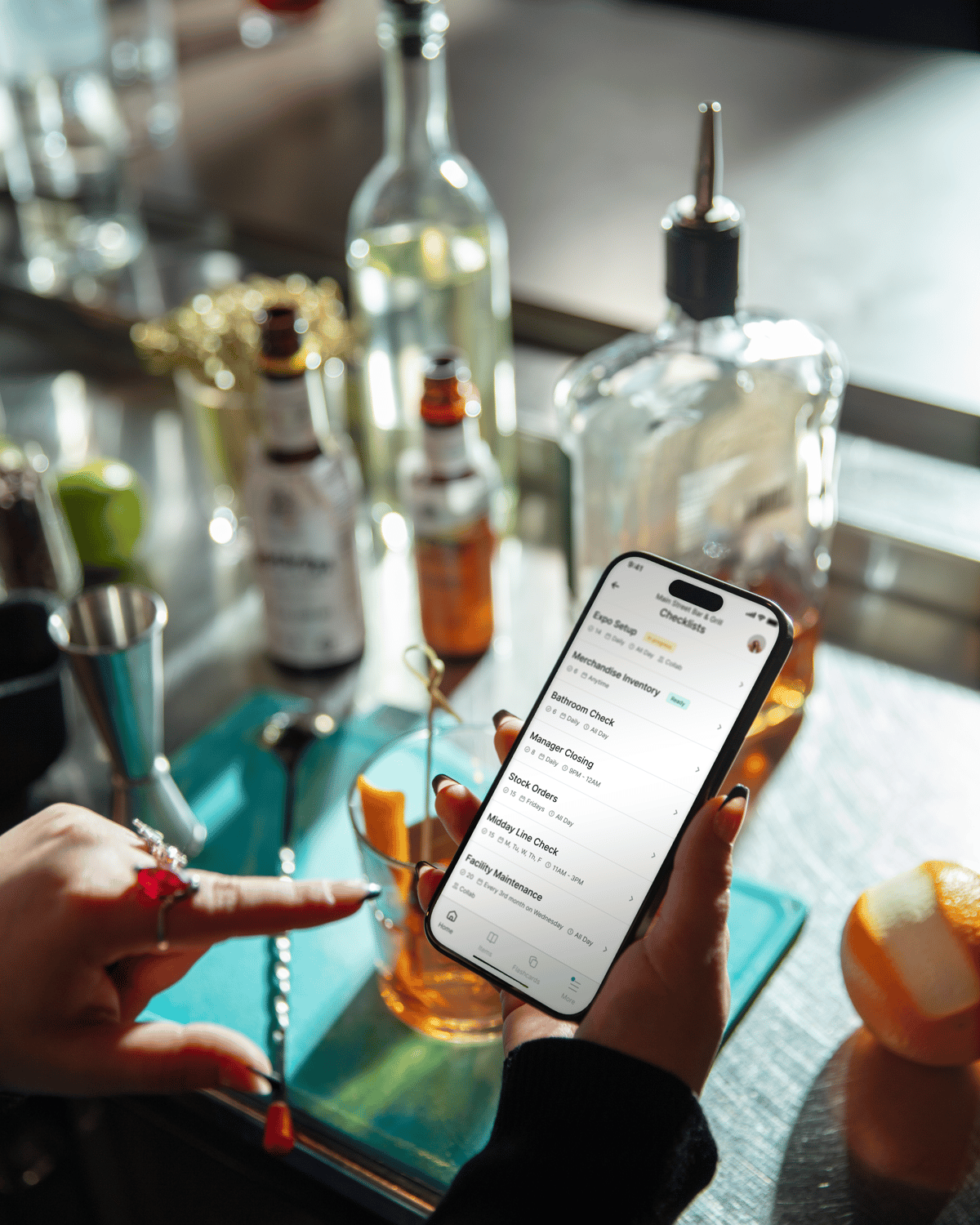
Restaurant checklist app talk used to sound optional. Now it’s what you reach for when you’re tired of hearing, “Yeah, we did it,” and then finding the sanitizer bucket empty, the temps half-filled, and the closer swearing they “totally cleaned the slicer.” Paper can work. It just doesn’t hold up when the floor gets loud, the printer jams, and your best manager has a day off.
When you switch to digital checklists, you’re not doing it to “go tech.” You’re doing it because you want the standard to hold on a slammed Saturday, not just on a calm Tuesday at 2 p.m.
Restaurant checklist app reality check: what paper misses in real life
You already know why paper is attractive. It’s cheap, familiar, and nobody needs a password. But paper has two big problems: it’s easy to lose, and it’s easy to pretend.
If you have ever flipped through a binder and noticed the same handwriting on every line, you’ve seen it. Not because your team is “bad,” but because paper makes it way too easy to rush, backfill, and move on.
- No reliable trail: You can’t confidently answer “who did what” without playing detective.
- Visibility stops at the building: If you’re the owner, director, or training lead, you only learn the truth when you physically walk the store.
- Binder drift: One manager updates a list, another doesn’t, and now you’ve got three versions of the same standard operating procedure (SOP).
- “End-of-night finishing”: A checklist gets completed after the shift, when the work is already done or skipped.
This is exactly why you see operators asking peers what they use when they’re done with paper and want something that actually sticks, like in that restaurant operator thread on switching to digital ops checklists.
Why a restaurant checklist app changes behavior (without turning you into the checklist police)
The best shift leaders are already coaching all day. The last thing you need is another “gotcha” tool. A good checklist app does the opposite. It makes the work clearer and the follow-up easier, so you can spend less time hunting and more time leading.
Instead of a binder that gets reviewed after close, you get a living view of the shift. What’s done. What’s late. What got flagged. That’s the part that makes digital checklists feel less like paperwork and more like a daily operating rhythm.
- Tasks live where the work happens: On a phone or tablet, not hidden in the office.
- You get earlier signals: If line temps are missed at 4 p.m., you can fix it at 4:10 p.m., not tomorrow morning.
- The standard stays the standard: New manager, same close. New location, same open.
Restaurant checklist app accountability: timestamps, photo proof, and fewer “pencil-whipped” closes
Let’s talk about the awkward part. Missed work is expensive. It hits food safety, equipment lifespan, guest experience, and your managers’ sanity. But accountability does not have to feel like surveillance. It can feel like clarity.
When tasks are tied to a person and a time, the conversation changes. You stop arguing about whether something happened and start focusing on how to fix it and prevent it next shift.
In Shifty, that shows up as Checklists with Photo Proof. If your standard is “take a photo of the walk-in thermometer” or “show the sanitized slicer,” you can make that part of the task. No side quests. No extra paperwork. Just a clean expectation your team can follow.
Restaurant checklist app vs paper when you go multi-unit: paper turns into a blind spot
One location can survive on paper if you’ve got a strong general manager who lives in the details. The second you’re running two, five, or twenty stores, paper stops being “simple” and starts being invisible.
Here’s what happens at scale: you get binders that look fine during visits, but you cannot compare location to location. You cannot spot patterns across dayparts. You cannot tell whether Brand Standard A is actually happening at Location 7 on Wednesday nights. You need one source of truth, not a thousand pieces of paper in a thousand drawers.
Shifty was built for that reality. You can run consistent checklists across every location, then use manager-facing visibility to see what’s slipping before it becomes a habit.
Paper vs. digital checklists: what actually matters mid-rush
On a busy shift, you do not care about “features.” You care about outcomes. Are the critical tasks getting done? Are you catching misses while there’s still time to recover? Are managers spending their time on the floor instead of auditing binders?
| Operational need | Paper checklists | Digital checklists |
|---|---|---|
| Know tasks are done | Depends on honesty and spot-checking | Time-stamped completion tied to a user, often with proof |
| Catch misses early | You discover it after the rush or next day | Real-time progress plus reminders and escalation |
| Standardize across locations | Different binders and “local versions” everywhere | Central templates with consistent updates |
| Coach in the moment | Hard to confirm what happened | Flags, notes, photos, and trends you can act on |
| Reduce manager admin time | Printing, filing, chasing paperwork | Automatic records and searchable history |
What to look for in restaurant task management software (so it survives day two)
If you’re evaluating restaurant task management software, you’re not buying a demo. You’re buying behavior change. That only happens if the tool feels natural on the floor.
- Mobile-first completion: If it’s built for a desktop, your team will avoid it.
- Recurring scheduling: Opening, mid, closing, weekly, monthly tasks should schedule themselves.
- Escalations for critical misses: If a must-do task is late or skipped, the right leader should know.
- Proof and context: Photos, notes, and flags that help you coach, not just “check a box.”
- Reporting you can use: Not vanity charts. Real patterns across shifts and locations.
One more thing: if the tool assumes your team has time to stand still and type, it was built for an office, not a kitchen.
Where Shifty fits: checklists that connect to training, scheduling, and standards
You do not need another disconnected app. You need fewer tools that actually work together, because every extra login is another place standards go to die.
Shifty is operator-built, and it shows up in the way the platform hangs together. Shifty Checklists help you run opens, closes, line checks, and cleaning routines with consistency. Then you connect those standards back to how you bring people in and get them confident fast.
Example: when you’re training a new hire, you can build a station-specific path with Training & Onboarding and tie standards directly into a shadow shift. That way, training does not depend on which trainer happened to be scheduled. The system carries the standard forward.
How to switch from paper to digital checklists without blowing up your week
The rollout that fails usually fails the same way: you try to digitize every list in the building at once. Your team feels buried, managers feel behind, and the tool gets blamed for what is really a rollout problem.
- Start with the non-negotiables: Temps, sanitizer, end-of-night equipment care, anything that protects food safety and expensive assets.
- Use your current paper as the draft: Clean it up, remove duplicates, and make it your baseline.
- Assign owners by daypart: Opening, mid, closing. Front of house / back of house (FOH / BOH) can have different owners, and that’s fine.
- Coach with receipts, not vibes: Use missed tasks as training moments, not public call-outs.
- Add the rest after week one: Weekly maintenance, monthly deep cleans, and audits land better once daily habits are steady.
And yes, the paper fans have a point. Paper doesn’t crash. If connectivity is an issue in your building, treat that like an operations fix, not a tech footnote. A dedicated device, stronger Wi‑Fi, or a clear backup plan saves you headaches.
FAQ: Restaurant checklist app vs. paper
Are digital checklists worth it for a single-location restaurant?
Yes, if you’re dealing with missed tasks, inconsistent closes, or manager burnout. You get visibility without digging through binders, and that alone changes how the shift runs.
What is the biggest advantage of a restaurant checklist app?
Actionable accountability. When tasks are time-stamped and tied to a person, you can coach the right habit and catch problems before they turn into guest complaints or safety risks.
Will my staff actually use digital checklists?
They will if it’s mobile-first and the lists are written the way your shift runs. Adoption goes up fast when leaders follow up consistently for the first couple of weeks.
How do digital checklists support food safety and inspections?
They give you a cleaner record of completion and exceptions, often with notes and photos. That means less scrambling, fewer gaps in temperature logs, and better follow-through on cleaning routines.
What should I prioritize when evaluating restaurant task management software?
Mobile usability, recurring scheduling, escalation for critical tasks, proof options, and reporting that helps you spot patterns across shifts and locations.
Conclusion
Paper checklists can document what should happen. A restaurant checklist app helps you see what actually happened, coach to a clear standard, and keep every location running the same playbook even when you are not in the building.
If you want checklists that stick and a system that connects daily execution to training and leadership, start with Shifty. Read Leadership: You’re Doing the Right Things - Now Let’s Help You Do Them the Right Way, then review Shifty pricing options for restaurants to see what rollout can look like for your team.
Written by
The Shifty Team


See Shifty in action.
Book a 15-minute demo and see how Shifty helps restaurants schedule, train, and retain.
Book your free demo